Midjourney Website vs Discord: Best Choice for AI Image Creation
You’ve probably seen AI-generated images online and are curious about how to create them yourself. Whether you want to use them for personal projects, sell them, or enhance your business, starting with the right platform is key.
A common question beginners have is: Midjourney website vs Discord – which should I choose?
The answer depends on what you’re looking to accomplish with AI image creation, beyond just making stunning visuals.
This article will help you compare both platforms so you can decide which option aligns better with your needs.
🔑Key Takeaway
- Ease of Use: Midjourney website wins with its clean, beginner-friendly design. Discord may feel chaotic for first-timers but offers depth as you get more comfortable.
- Accessibility: It does not matter if you use Midjourney website or Discord, you can use Midjourney on a computer, laptop, tablet or cell phone to create images.
- Community Engagement: Discord is a hub for collaboration. It’s ideal for those seeking inspiration or feedback from other creators.
- Features: While the website focuses on streamlined image generation, Discord offers several channels for interaction.
What Is Midjourney and How Does It Work?
Midjourney is a text-to-image AI tool. Simply put, you enter text (called a prompt) describing what you’d like to see, and the AI transforms your words into a stunning visual.
You have two main ways to access the platform:
- The Midjourney Website: A simplified, user-friendly option designed for those who prefer a straightforward way to create images without distractions.
- Discord Integration: An option that brings together a buzzing community of creators, offering collaboration and advanced options.
Each option has unique benefits, but the process remains the same: your imagination is the only limit to what you can create.
Comparing Midjourney Website vs Discord
The choice boils down to your preferences for accessibility, social engagement, and how you like to work creatively.
Ease of Use and Access
Midjourney website – no set up needed
- Simple as it gets
- Pay for the plan you want
- Log into the website
- Type your Prompt
- Let Midjourney handle the rest
It’s like opening a creative sketchbook right in your browser.
The interface is straightforward, with everything laid out intuitively. No commands, no channels—just a few clicks.
Decided to go the easier route of using the Midjourney website? Jump on over to my Midjourney website beginners tutorial to get started creating images quickly.
Discord – setup required
- Pay for the plan you want
- Download Discord software
- Join the server (or create one of your own)
- Get familiar with the commands
- Learn how the different channels work
It might seem chaotic, but if you already like using the Discord platform, this setup could feel familiar and more engaging over time.
Community Engagement and Collaboration?
Midjourney website
- Focuses on solitary creation
- Clean and simple layout
- Work entirely on your own
- Quieter environment
- No distractions – do not need to sift through community chatter.
- Join Chat if you want to
Discord
- Focuses more on collaboration
- Engaging with others to see how they prompt
- Share ideas
- Join channels to offer feedback on yours and other peoples images generated
So in a nut shell, the website offers a distraction-free, solo art experience, where as, Discord bridges the gap between personal creativity and social learning.
Customization and Advanced Features
Midjourney Website
- Simplicity
- Don’t want to get technical
- Don’t need to learn commands (if you don’t want to)
Discord
- Advanced customization capabilities
- Use specific commands to fine tune your creations
Using The Midjourney Website
The Midjourney website provides a straightforward, no-pressure experience.
You can focus entirely on generating your images. The layout on the site is clean, offering a guided approach to creating art without overwhelming beginners.
Features of the Midjourney Website
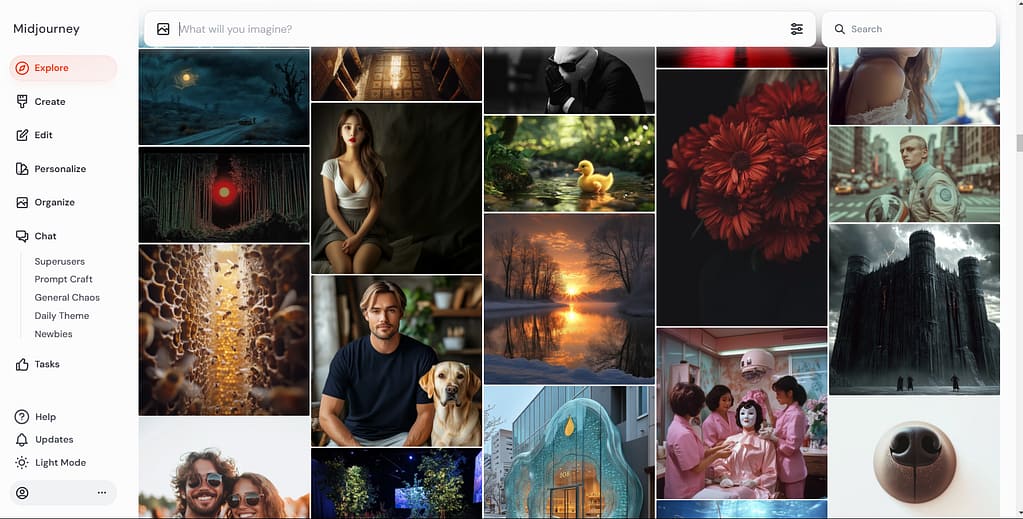
One of the first things you’ll notice about the Midjourney website is its clean and clear design.
Here are some standout features:
- Streamlined Interface: Forget about typing commands or navigating multiple channels. The website’s layout places all tools and settings within easy reach.
- Visual Options: With minimal effort, you can preview different styles and adjust configurations. Think of the interface as having a digital art studio at your fingertips.
- Beginner Usability: With everything easily accessible, there’s no need to memorize commands or deal with distractions.
How to Get Started on Midjourney Website
Getting started on the Midjourney website is straightforward. Here’s how you can begin your creative journey in just a few steps:
- Visit the Midjourney Website: Head over to Midjourney’s official site and explore the homepage.
- Sign Up: Create an account. All you need is an email address and password.
- Choose a Plan: Select a subscription plan that suits you. The entry-level tier is perfect for beginners.
- Explore Tools: Familiarize yourself with the site’s design tools, tabs, and image options.
- Create Your First Image: Use the text prompt box to describe the image you want. For example, “beautiful butterfly, watercolor, clipart style”
The first-time setup takes minutes, and soon you’ll be generating your custom visuals without breaking a sweat.
Benefits of Using the Midjourney Website
Why should you prioritize the website over Discord when you’re a beginner? Here are the key benefits:
- Saves Time: On the website, you jump straight into creating images. No learning commands, no downloading any software, no joining servers—just click and create.
- Straightforward Navigation: Everything you need is organized and accessible without unnecessary clutter.
- Beginner-Friendly: If you’re hesitant about investing time into understanding complex platforms like Discord, the website is a safe bet. It’s designed for hassle-free use.
The website simplifies the process of AI image generation, letting you focus less on logistics and more on creativity.
This makes it an ideal starting point for anyone new to AI tools who values ease and efficiency.
Using Midjourney on Discord
Midjourney on Discord adds a social and collaborative dimension to AI-generated images that’s hard to replicate elsewhere. If you enjoy connecting with like-minded people and unlocking advanced features through chat commands, Discord could be your ideal platform.
Features of Midjourney on Discord
If you’re considering the Discord route, you’ll find numerous tools to enrich your AI experience. Why choose Discord? Because it’s more than just a platform – it’s a community with tools to level up your skills.
- Community Engagement: Interact with millions of creatives, share ideas, and get instant feedback. Imagine a digital art class where you’re surrounded by peers and mentors.
- Advanced Chat Commands: Generate images with specific settings by typing simple commands such as
/imaginefollowed by your prompt. The flexibility makes customization easy once you get the hang of it. - Collaborative Projects: Some Discord servers promote teamwork, so you can work with others on shared goals or themed challenges.
How to Get Started on Midjourney via Discord
Joining Midjourney on Discord for AI image creation does take a little time to set up.
- Signup for Midjourney
- Pay for your plan
- Download and Set Up Discord: If you don’t already have the app, download it on your mobile device or computer. Create an account; it’s quick and free.
- Join Midjourney’s Server: Use this official invite link to access the Midjourney server.
- OPTIONAL: Create Your Own Server: Create your own server in Discord and invite the Midjourney Bot to your new server.
- Find Beginner Channels: Look for channels labeled “newbie” or “getting started.” These are often designed for first-time users.
- Interact with the Bot: Test out the Midjourney bot by typing prompts like /image prompt: impasto painting, beautiful field of flowers. The bot will process and generate an image based on the description.
- Experiment and Explore: Use advanced commands found in the Discord Quick Start guide to tweak image styles, resolutions, or other settings.
Midjourney’s Discord community is constantly growing, and there’s no better way to learn the ropes than by diving in.
Jumping into Community: Discord’s Unique Benefits
Discord might seem complicated at first, but it offers an unbeatable community-driven experience for Midjourney users.
Think of it as walking into a workshop where everyone’s bouncing ideas off each other, sharing tips, and showing their creative work. Discord integrates lively conversations and collaborative features.
If you’re ready to embrace the vibrant Midjourney Discord, you’ll have access to live responses, member-generated workflows, and extensive support resources.
For guidance, check out the Midjourney Discord interface documentation.
However, keep in mind that the initial setup and commands take a little time to learn.
Challenges of Using Midjourney on Discord
While Discord offers an impressive set of features, it’s not without its challenges. For first-timers, the experience can feel overwhelming. Here are some hurdles you might face:
- Steep Learning Curve: If you’re unfamiliar with Discord, navigating multiple channels and inputting commands can feel tricky. It’s like walking into a bustling café without knowing where to order.
- Time Investment: Mastering the bot commands and exploring all the features can take time. It’s a bit like learning a new tool—worthwhile, but not instant.
- Potential for Confusion: Between community posts, bot outputs, and layered conversations, you might find it challenging to locate what you need at first.

Navigating Midjourney on Discord may feel like learning a new language, but once you adapt, the features and community engagement make it worth your while. Ready to give it a try?
To Wrap It All Up
The decision between using the Midjourney website vs Discord really boils down using a simple laid out platform or a more technical platform.
Do you value a simple, beginner-friendly approach with limited technical experience? Then the website provides simplistic way to generate stunning AI images without the distractions of commands or community noise.
If collaboration and flexibility are what you’re after, Discord’s vibrant creator community and advanced features might be more your speed.
Whether you pick the streamlined simplicity of the Midjourney website vs Discord’s collaborative energy, both platforms will help you unlock your creative potential with precision and ease.
Midjourney Website vs Discord FAQs
Here are the most frequently asked questions to give you a better understanding of what each offers and how they fit into your creative needs.